Search the database
Search forum topics
Search members
Search for trades
diablo2.io is supported by ads
8 replies   3915 views
1

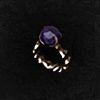
Protector's Stone lacks the new Colossal Jewel icon.
No data yet

Bug Report

2

Description

Device: PC
Browser: Firefox 147.0.3
OS: Windows 11

Steps to reproduce:
Offer a Protector's Stone for trade and it displays the icon of a regular boring Jewel, not the Stone bust of Korlic (contra Protector's Frost, which does display Korlic's Stone bust.)

Anything else to add:
I've noticed that, in trade, Protector's Stone is the only Colossal Jewel that still uses the classic Jewel icon. I'm blaming my trade offer's quiet reception on this, so please fix immediately. ;)

It's just a cosmetic issue and I feel sorry for making this a technical bug report, but I couldn't find a more proper place to report.

Description by hyeonsestoast
5

Can be used to make Runewords:

7
Device: PC
Browser: Firefox 147.0.3
OS: Windows 11

Steps to reproduce:
Offer a Protector's Stone for trade and it displays the icon of a regular boring Jewel, not the Stone bust of Korlic (contra Protector's Frost, which does display Korlic's Stone bust.)

Anything else to add:
I've noticed that, in trade, Protector's Stone is the only Colossal Jewel that still uses the classic Jewel icon. I'm blaming my trade offer's quiet reception on this, so please fix immediately. ;)

It's just a cosmetic issue and I feel sorry for making this a technical bug report, but I couldn't find a more proper place to report.
Fixedby Teebling1 day agoGo to post
Teebling wrote: 2 days ago
Fixed a bug where the Jewels item type filter failed to be auto-selected when creating or editing a listing involving any unique jewel. Backfilled any existing trades of these items to have this item type filter set to Jewels.
Teebling wrote: 2 days ago
Fixed a bug where manually selecting the Jewel filter when creating or editing a listing involving any unique jewel would overwrite the existing icon.
7
User avatar

Teebling 9729Admin

RotW Warlock Europe PC
I've managed to reproduce this bug.

If you create the listing, and select Protector's Stone from the dropdown like normal, then the correct icon is used. If however, you re-select the item type 'Jewels' from the filters (no idea why you would do this in the first place, as this is already pre-selected for you), then it overwrites the unique icon for Protector's Stone with the standard 'Jewel' icon.

I will make sure that applying the Jewel filter a second time does not overwrite the original icon if it has a unique icon (as is the case with these new jewels).

7
OP
Ah, damn. Foiled by my own penchant for getting all the details extra correct. Thank you for the quick investigation and solution!
7
hyeonsestoast wrote: 5 months ago
Ah, damn. Foiled by my own penchant for getting all the details extra correct. Thank you for the quick investigation and solution!
If you make a trade post and select the auto fill option you don't need to select the item type.
You only need to select item type if listing a magic or rare item. If I go and list Shimmering Small Charm of Balance I would need to go in and select Small Charm as the item type, because the site doesn't have that item built in to the database.
7
OP
Knappogue wrote: 5 months ago
If you make a trade post and select the auto fill option you don't need to select the item type.
You only need to select item type if listing a magic or rare item. If I go and list Shimmering Small Charm of Balance I would need to go in and select Small Charm as the item type, because the site doesn't have that item built in to the database.
Thanks for the tip! I noticed that, but I sort of remember having to recheck the item qualities when listing that Protector's Stone. I can't recall exactly what though, so no useful info out of me right now. :(
7
hyeonsestoast wrote: 5 months ago
Knappogue wrote: 5 months ago
If you make a trade post and select the auto fill option you don't need to select the item type.
You only need to select item type if listing a magic or rare item. If I go and list Shimmering Small Charm of Balance I would need to go in and select Small Charm as the item type, because the site doesn't have that item built in to the database.
Thanks for the tip! I noticed that, but I sort of remember having to recheck the item qualities when listing that Protector's Stone. I can't recall exactly what though, so no useful info out of me right now. :(
Item qualities yes
Item type no
👍
7
OP
Just to make sure -
Is this the intended behavior? Selecting a Guardian's Light as the item for trading doesn't seem to toggle its Item Type as a Jewel - which might be why I manually selected it the last time. I'll let them be this time, but I wanted to confirm if this is what is supposed to happen or if it's a bug.
7
User avatar

Teebling 9729Admin

RotW Warlock Europe PC
Ah ok, yeah it should be preselecting item type jewel, which it isn't so - bug that I need to fix.

7
User avatar

Teebling 9729Admin

RotW Warlock Europe PC
Teebling wrote: 2 days ago
Fixed a bug where the Jewels item type filter failed to be auto-selected when creating or editing a listing involving any unique jewel. Backfilled any existing trades of these items to have this item type filter set to Jewels.
Teebling wrote: 2 days ago
Fixed a bug where manually selecting the Jewel filter when creating or editing a listing involving any unique jewel would overwrite the existing icon.
This post was marked as the fix.

9

Advertisment

Hide ads
999

Greetings stranger!

You don't appear to be logged in...

99

Who is online

Users browsing Bug Reports: No registered users and 24 guests.

No matches
You haven't specified which diablo2.io user you completed this trade with. This means that you will not be able to exchange trust.

Are you sure you want to continue?

Yes, continue without username
No, I will specify a username
Are you sure you want to delete your entire Holy Grail collection? This action is irreversible.

Are you sure you want to continue?

Yes, delete my entire collection
No, I want to keep my collection
Dclone Tracker preferences:
Choose what you see in the sidebar widget and what you are notified about.
Version:
Game mode:
Online Terror Zone Tracker preferences:
Choose when and which online terror zones you are notified about.
Value:
Hide ads forever by supporting the site with a donation.

Greetings adblocker...

Warriv asks that you consider disabling your adblocker when using diablo2.io

Ad revenue helps keep the servers going and supports me, the site's creator :)

A one-time donation hides all ads, forever:
Make a donation