Exact match
Only exact matches to your keyword phrase(s) will be returned by the search.
(Recommended)
(Recommended)
Any match
Results match any of your keywords (individually) instead of the whole exact phrase.
Example: Searching 'Tyrael's Might' with this option will return results for both Tyrael's Might and Templar's Might.
Search titles only
Only the titles of trades will be searched. Your search will ignore text in the trades' descriptions or any other offers in the trade.
(Recommended)
(Recommended)
Also search in descriptions
Text in the trades' descriptions (the original posts) will be also be searched, as well as titles.
This is handy for searching for magical attributes, modifiers, or other relevant info about the item using keywords. Matches in descriptions are highlighted in yellow for you :)
This is handy for searching for magical attributes, modifiers, or other relevant info about the item using keywords. Matches in descriptions are highlighted in yellow for you :)
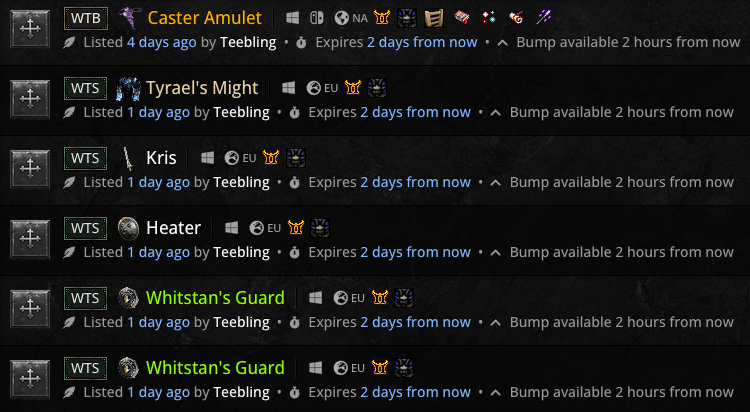
Display as trades
Results will be rendered as a list of trades showing pedigree information. This is the recommended way of display results.
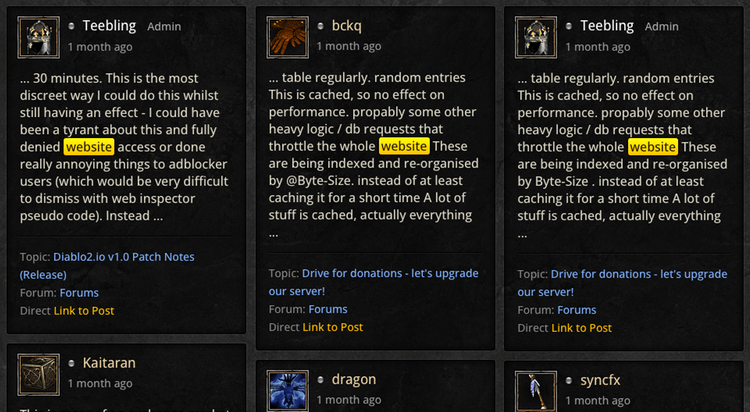
Display as posts
Results will be rendered as cards with larger, more detailed text previews and search terms highlighted.
Add additional keywords
Refine your results further by adding an extra keyword to your phrase.
Sorting options
Sort or limit the results of your search.
Reset search config
This resets the advanced search configuration options to their defaults.
Add keywords
Please note
This does not change your original keyword, it adds an extra word onto it.
Useful when combined with the 'Search Descriptions' option for finding specific magic stats on an item.
Useful when combined with the 'Search Descriptions' option for finding specific magic stats on an item.
Resurrected
RotW
WTS
WTB
Active
Sold
Online
Non-ladder
Ladder
Softcore
Hardcore
PC
Switch
Playstation
Xbox
Rarity
Qualities
Item Type
Stats
Class
Misc
Reset filters
Select defaults
Apply filters
Resurrected or Reign of the Warlock
Use this filter to filter by Resurrected of Reign of the Warlock listings.
Resurrected characters cannot trade with Reign of the Warlock characters and vice versa.
Resurrected characters cannot trade with Reign of the Warlock characters and vice versa.
Want to Sell/Want to Buy
This option indicates whether you're looking for sell orders or buy orders for this item.
Active trades only
This will return only active trades (all trades that have not been marked as sold within the last 3 days).
Recently sold
This will return only recent sales that have been marked as sold within the last 3 days (before they turn into historical data).
To see historical prices, use the Price Check tool.
To see historical prices, use the Price Check tool.
Online traders only
This will return only trades in which the listing author is currently online.
Non-ladder trade
The search will return results for Non-ladder trades only.
Ladder-only trade
The search will return results for Ladder trades only.
Softcore trade
The search will return results for softcore trades only.
Hardcore-only trade
The search will return results for Hardcore trades only.
Platform(s)
Indicates which platform you are looking to trade on.
Rarity/category
Filter search results by rarity or the player services category.
Qualities
Filter search results by item qualities such as ethereal, superior, sockets, unid etc.
Item Type
Filter search results by item type such as charms, rings, body armor etc.
Item Stats
Filter search results by item stats such as MF, IAS, FRW etc.
Class or Hireling
Filter search results by items deemed 'good for' a specific class or hireling.
Miscellaneous
Filter search results by miscellaneous properties.
Reset
This resets the trade filter options to the dead defaults with no profile settings taken into account.
Select your default profile filters
Clicking this will select your default profile filters for game version, SC/HC, Non-Ladder/Ladder, Expansion/Non-Expansion, and your main platform.
Apply filters (refine results)
Click to refine these search results. This refreshes the results, applying any new filter selections you have made.
Note that the more filters you apply, the less results you will see; the filters work on
AND logic.
Unique
Runeword
Set
Base
Crafted
Rare
Magic
Misc
Player Services
Expansion
Non-Expansion
Americas
Europe
Asia
Amazon
Assassin
Necromancer
Barbarian
Sorceress
Paladin
Druid
Warlock
Rogue Scout
Desert Warrior
Iron Wolf
Harrogath Barb
+ Skiller
Resists
Life
Mana
Magic Find
Extra Gold
Increased Attack Speed
Faster Cast Rate
Faster Run/Walk
Faster Hit Recovery
Enhanced Damage
Min/Max Damage
Attack Rating
Non-Ethereal
Ethereal
Non-Superior
Superior
Identified
Unidentified
No sockets
1 socket
2 sockets
3 sockets
4 sockets
5 sockets
6 sockets
Perfect roll
Free :)
Small Charm
Large Charm
Grand Charm
Amulets
Rings
Jewels
Body Armor
Barb Helms
Belts
Boots
Gloves
Helms
Pelts
Shrunken Heads
Shields
Grimoires
Targes
Axes
Katars
Daggers
Swords
Hammers
Mauls
Maces
Clubs
Scepters
Polearms
Spears
Bows
Crossbows
Javelins
Throwing
Orbs
Staves
Wands
Rarity
Select the rarity of the item you are looking for.
If you selected an item that exists in the database from the searchbox dropdown, the rarity filter of the search should already be set.
If you selected an item that exists in the database from the searchbox dropdown, the rarity filter of the search should already be set.
Miscellaneous
This includes Runes, Gems, Quest Items, Keys, Materials, and anything else in the 'Misc' section of the database.
Player Services
Select this option if you're looking for services like rushes, keys, ubers, tunnels etc.
Do not post 'need rush' etc. in the main discussion forums.
Do not post 'need rush' etc. in the main discussion forums.
Game Mode
Note that 'Non-Expansion' means 'Pre-LoD in Resurrected' or 'Non-Expansion character in Resurrected' - this is different to Legacy (which refers to versions of Diablo 2 other than Resurrected).
Region
Note that you can trade with anyone in any region in Resurrected. This filter option only indicates that you are searching for trades local to one region, which makes game organisation easier for your trade.
Good for this Class
The search will return results that match this custom opinion filter.
Use this to browse items that are good for a particular class, for example traders will often apply this filter if their item has +to X class or skill tree modifiers.
Use this to browse items that are good for a particular class, for example traders will often apply this filter if their item has +to X class or skill tree modifiers.
Good for this Mercenary type
Used for returning trades that are good for your current hireling.
Modifiers
The search will return results of items that match any of the selected 'modifier' filters
Handy if you're looking for a particular stat on an item. If you can't find a filter, use a keyword instead.
Handy if you're looking for a particular stat on an item. If you can't find a filter, use a keyword instead.
Non-Ethereal
Returns results for items that are not Ethereal quality.
Ethereal
Returns results for items that are Ethereal quality.
Non-Superior
Returns results for items that are not Superior quality.
Superior
Returns results for items that are Superior quality.
Identified
Returns results only for items that have already been identified.
Unidentified
Returns results for only for items that have been marked as unidentified (unid).
No. of Sockets
The search will return filtered market results for the selected number of sockets.
Perfect roll
Returns results for items that have been marked as being 'perfect' rolls.
Free item
Returns results for items that have been marked as 'free' - where nothing is expected in exchange.
Item Type
Useful as a standalone filter or combined with additional filters to discover charm trades.
Item Type
The search will return trades of items that match this specific item type.
/search.php?keywords=&terms=all&author=&fid%5B%5D=16&sc=0&sk=t&sd=d&st=0&ch=&t=&&submit=Search
Teebling Admin
Runeword missing rune effects - fixed.
Added Hysteria and Mania (renamed Hustle runewords).
Added all new unique items:
Ars Al' Diablolos (Blapshemous Grimoire)
Ars Tor'Baalos (Blapshemous Compendium)
Ars Dul'Mephistos
Measured Wrath
Dreadfang
Wraithstep
Bloodpact Shard
Opalvein ...
Forum: Forums
Direct Link to Post